Crack Interview
Upgrade yourself long with us.
Hi Future PostgreSQL DBAs,
If you want to build your career as a PostgreSQL DBA, spend some time learning the fundamentals and preparing answers in your own words. Don't just memorize interview questions. Focus on understanding the concepts behind them.
Key areas to focus on:
- PostgreSQL Architecture
- Database Installation & Configuration
- Backup and Recovery (pg_dump, pg_basebackup, PITR)
- Replication and High Availability
- Performance Tuning and Query Optimization
- Indexes and Vacuum Operations
- Monitoring and Troubleshooting
- Security and User Management
A strong PostgreSQL DBA is not someone who knows all the answers, but someone who understands how PostgreSQL works and can solve real-world problems.
Keep learning, practice regularly, and prepare answers in your own words to build confidence for interviews and on-the-job challenges.
Best of luck on your PostgreSQL DBA journey! 🚀
Technical and Real-Time Scenario Based Questions
1. What is PostgreSQL?
2. What are the key features of PostgreSQL?
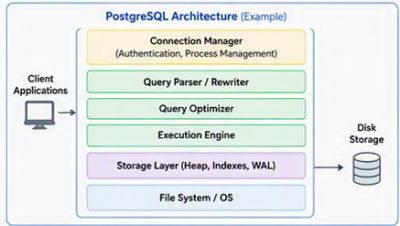
3. Explain the PostgreSQL architecture?
4. What are the important background processes in PostgreSQL?
5. How will you check background processes in PostgreSQL?
6. What is checkpoint? What happens When checkpoint in PostgreSQL?
7. What is WAL writer? What it does?
8. When WAL writer write data to WAL segment?
9. Explain the difference between WAL vs Data File writes.
10. Explain Write‑Ahead Logging (WAL) and its role.
11. What is the WAL related parameter in postgresql.conf file?
12. What are the differences between WAL Receiver and WAL Writer?
13. What is BGWriter in PostgreSQL?
14. When BGwriter writes data to disk?
15. Which parameters controls the behaviour of BGWriter?
16. What are the different between background writer vs check pointer?
17. What is a tablespace?
18. What are the default system databases in PostgreSQL?
19. What are ACID properties?
20. Explain the concept of MVCC in PostgreSQL.
21. What is VACUUM and why is it important?
22. What is the purpose of the VACUUM command?
23. Auto vacuum is not keeping up with dead tuples. What do you do?
24. How do you backup and restore a PostgreSQL database?
25. How do you take a hot backup?
26. How do you take a full database backup using pg_dump?
27. How does PostgreSQL handle replication?
28. What’s the difference between synchronous and asynchronous replication?
29. What are the different types of replications?
30. Can you please differentiate between Physical and Logical Replication in PostgreSQL?
31. How do you set up streaming replication in PostgreSQL?
32. What is file-based Log shipping in PostgreSQL?
33. What are the key features and benefits of replication in PostgreSQL?
34. How will you be monitored replication in PostgreSQL?
35. What steps would you take if replication lag is increasing?
36. Your replication setup is broken after a crash. How do you re‑sync replicas?
37. Explain how you’d design HA PostgreSQL clusters (Patroni, repmgr, pgpool‑II).
38. what are the different types of conf files in PostgreSQL?
39. What are the memory components in PostgreSQL?
40. What are the parameters settings to balance durability vs performance in PostgreSQL?
41. What is the role of pg_hba.conf?
42. How do you manage users and roles in PostgreSQL?
43. What is the authentication method in PostgreSQL?
44. How authentication happens in PostgreSQL?
45. What is the role of pg_indent.conf?
46. What is the role of postmaster in PostgreSQL?
47. How do you secure a PostgreSQL production environment?
48. What is recovery_target_time?
49. What do you mean by restore_command?
50. What is the different type of backup methods in PostgreSQL?
51. How will you achieve Point in time recovery in PostgreSQL?
52. How will you enable parallel backup in PostgreSQL to reduce the backup time?
53. What are the key differences between PGBackRest and barman in PostgreSQL?
54. How to repair corrupted database in PostgreSQL?
55. How does PostgreSQL handle concurrency?
56. How can you enforce unique constraints in PostgreSQL?
57. What are the different data types available in PostgreSQL?
58. What is the difference between char and Varchar?
59. How do you create a stored procedure in PostgreSQL?
60. What is the difference between view and materialized view?
61. What is the difference between function and store procedure?
62. What are the differences between table and materialized view?
63. Explain the difference between DELETE and TRUNCATE.
64. Explain the difference between Union and Union All.
65. Explain the difference between INNER JOIN and OUTER JOIN.
66. What are best system catalogs to monitor PostgreSQL database?
67. What are extensions in PostgreSQL?
68. What is the use of pg_stat_activity?
69. How will you check the wait events in PostgreSQL?
70. What fsyncs does in PostgreSQL?
71. What will be the impact on data if we disabled the fsyncs in PostgreSQL?
72. What is page in PostgreSQL?
73. What is the different type of pages in PostgreSQL?
74. Explain the internal layout of page in PostgreSQL?
75. What is FSM?
76. Can you differentiate between Heap and Toast pages?
77. Can you explain Visibility Map page (VM) in PostgreSQL?
78. What are common causes of slow queries?
79. What are common causes of deadlocks and how do you resolve them?
80. How do you handle deadlocks in PostgreSQL?
81. What do you mean by index page?
82. How does PostgreSQL handle indexing? What types of indexes are available?
83. What is the difference between b-tree and BRIN indexing?
84. What is the difference between JSON and JSONB in PostgreSQL?
85. How do you troubleshoot slow queries in PostgreSQL?
86. How can you optimize query performance in PostgreSQL?
87. How can you list all databases in PostgreSQL?
88. How can you update multiple rows in PostgreSQL?
89. What is a sequence in PostgreSQL?
90. What are CTEs, and why are they used?
91. What is the difference between CTE and Sub-query?
92. What is the difference between NOW () and CURRENT_TIMESTAMP?
93. How can you perform a case-insensitive search in PostgreSQL?
94. How do you tune PostgreSQL for high‑write workloads?
95. What will you do when you get “53300: too many connections” error?
96. How do you troubleshoot high CPU usage caused by queries?
97. What is difference between Explain and Explain Analyze?
98. You get a call that the production database is slow. What is your process for troubleshooting the issue?
99. What is different between data masking and encryption?
100. Explain the physical storage architecture of PostgreSQL.
What files are created when a new table is created?
What is stored in pg_class?
103. What happens internally when an INSERT statement is executed?
Why is WAL written before data files?
What is Write-Ahead Logging?
106. Explain what happens internally during UPDATE.
Why does UPDATE increase table size?
Explain HOT updates.
109. Explain MVCC in PostgreSQL.
How does PostgreSQL avoid reader-writer blocking?
What is transaction snapshot?
112. Explain the lifecycle of a row.
113. Why does table bloat occur?
Difference between VACUUM and VACUUM FULL.
How do you identify bloat?
How do you reduce bloat in production?
117. Explain WAL internals.
118. Explain checkpoint processing.
Why do checkpoints sometimes cause I/O spikes?
Which parameters affect checkpoint frequency?
121. Difference between WAL Writer and Checkpointer.
122. Explain PostgreSQL query execution flow.
What statistics does the planner use?
How do ANALYZE statistics impact plans?
125. Explain EXPLAIN ANALYZE output.
126. When would PostgreSQL prefer Sequential Scan over Index Scan?
127. Explain B-Tree internals.
128. Explain PostgreSQL index types.
129. Explain Streaming Replication internals.
130. Explain replication slots.
What happens if slot consumption stops?
How can replication slots fill a disk?
133. Explain PostgreSQL lock hierarchy.
134. Which operations acquire each lock?
135. How do you troubleshoot blocking sessions?
136. Explain PostgreSQL memory architecture.
137. Explain Point-In-Time Recovery (PITR).
138. What happens during PostgreSQL crash recovery?
139.
Scenario based Question
1. How would you migrate a multi‑TB PostgreSQL database to the cloud with minimal downtime?
2. What will you do when you see error – “pg_dump: error: query failed: ERROR: permission denied for table backup_customers_202505
pg_dump: error: query was: LOCK TABLE public. backup_customers_202505 IN ACCESS SHARE MODE”
3. What will you do when you get Query Timeout - ERROR: canceling statement due to statement timeout.
4. What will you do when you get No enough space left on device
5. How would you tune memory for a 512 GB server?
6. A PostgreSQL server suddenly grows from 5 TB to 8 TB within two weeks. How would you investigate?
7. Replication lag reaches 45 minutes during peak transaction load. How would you troubleshoot?
8. Application response time increased after Oracle → PostgreSQL migration although CPU is only 30%. What would you investigate?
9. "Walk me through what happens internally from the moment a client executes COMMIT until the transaction becomes durable on disk."
10. If you are performing backup on user database in PostgreSQL and you are getting error like ERROR: must be owner of table backup_sap_customers_20250526, then what will you do?
11. How do you prioritize tasks when multiple production issues arise?
12. Your AWS RDS PostgreSQL instance is hitting storage limits. What’s your first step?
13. PostgreSQL database suddenly consumes 95% disk. How do you troubleshoot?
14. Replica lag increased from 0 sec to 30 mins. What would you check?
15. After migration to AWS RDS, application latency doubled. What checks will you perform?
16. Autovacuum is not cleaning dead tuples. How do you investigate?
17. A query that normally runs in 1 second now takes 5 minutes. Walk through your troubleshooting steps.
18. PostgreSQL primary server crashed. Explain complete recovery process.
19. A table has 80% bloat. How would you reclaim space with minimal downtime?
20. CPU is normal but users report slowness. What PostgreSQL views would you check?
21. During a maintenance window, an RDS upgrade failed. What actions would you take?

PostgreSQL Architecture for DBA
Crack Interview
Upgrade yourself long with us.
Postgresql L2 and L3 DBA - Technical and Real-Time Scenario Based Questions
L2 Technical Questions
- Explain PostgreSQL architecture and background processes.
- What is MVCC and why is it important?
- Difference between VACUUM and VACUUM FULL?
- How do you identify blocking and blocked sessions?
- Explain backup and restore using pg_dump and pg_restore.
- Difference between HOT and non-HOT updates?
- Explain MVCC with an example.
- What happens when WAL files are removed accidentally?
- How do you identify long-running queries?
- Explain pg_hba.conf and postgresql.conf.
- How do you perform PITR?
- What causes transaction ID wraparound?
L2 Scenario Questions
- The database suddenly becomes slow. What views will you check first?
- Autovacuum is not cleaning dead tuples. How do you investigate?
- Disk usage increased rapidly overnight. What could be the reasons?
- User reports table lock issue during deployment. How do you identify blocker and victim sessions?
- 5. Backup completed successfully but restore validation failed. What steps will you take?
- Application users report slowness. What is your troubleshooting approach?
- Autovacuum is not running on a heavily updated table. What will you check?
- Disk usage suddenly increased by 200 GB overnight. How will you investigate?
L3 Advanced Questions
- CPU 100% after application release. How do you isolate problematic queries?
- The query changed from 2 seconds to 20 minutes. Walk through the tuning steps.
- A table with 2 billion rows needs faster reporting. What design options exist?
- Excessive sequential scans are observed. Which statistics and indexes would you review?
- High checkpoint activity causes latency spikes. How would you optimize it?
- Replication lag increased from seconds to hours. How would you troubleshoot?
- The primary server crashed during peak load. Explain a failover approach.
- Replica storage is filling because of WAL retention. What checks are needed?
- Synchronous standby is unavailable. What business impact and recovery actions exist?
- Split-brain suspected after failover. What steps would you take?
- Explain streaming replication architecture.
- Synchronous vs asynchronous replication.
- How do replication slots work?
- Explain PostgreSQL upgrade strategies from v14 to v16.
- How would you tune a query using EXPLAIN ANALYZE?
L3 Scenario Questions
- Replication lag increases to 3 hours in production. Describe your diagnosis steps.
- Primary database crashes during peak business hours. How do you perform failovers?
- After deployment, CPU utilization reaches 100%. How do you isolate the root cause?
- An Aurora PostgreSQL cluster shows performance degradation. What AWS tools would you use?
- Describe a Sev-1 database outage handled by you.
- How do you coordinate with application, infrastructure, and cloud teams?
- Explain your RCA methodology.
- How do you validate DR readiness?
- Describe a successful PostgreSQL upgrade project from v14 to v16.
- Difference between RDS PostgreSQL and Aurora PostgreSQL?
- How do you perform minor and major version upgrades?
- Explain Performance Insights for usage.
- How do you monitor storage and replication lag in AWS?
- Migration approach using DMS, pg_dump, pg_restore.
- What are parameter groups and option groups?
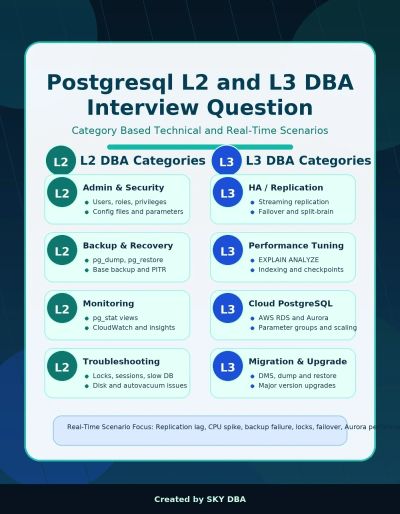
PostgreSQL L2 and L3 DBA interview questions categorized by DBA roles and scenarios.
Crack Interview
Upgrade yourself long with us.
At dB consultant, we provide mock interview services. Please be ready if you are planning to level up yourself in 2027.
5+ years of Postgresql DBA Interveiw Sample question and Answer
PostgreSQL Architecture and Internals
Q. Explain PostgreSQL architecture for a production system.
Answer: PostgreSQL follows a process-based architecture. A postmaster process accepts connections and forks backend processes for client sessions. The shared memory area contains shared buffers, WAL buffers, lock structures, and background process coordination. Important background processes include checkpointer, background writer, WAL writer, autovacuum launcher/workers, archiver, stats collector or statistics subsystem, and logical replication workers. For production support, I explain this architecture in terms of request flow: client connection, parse/plan/execute, buffer access, WAL generation, commit flush, checkpoint activity, and vacuum cleanup. A Level 3 DBA should understand how each process affects availability and performance.
Q. What happens internally when a transaction commits?
Answer: A transaction modifies data pages in memory and generates WAL records before data pages are persisted. On COMMIT, PostgreSQL ensures the required WAL is flushed according to synchronous_commit. This is the write-ahead logging guarantee: WAL must reach durable storage before corresponding dirty data pages are written. If the server crashes after commit but before dirty pages reach data files, crash recovery replays WAL and brings the database to a consistent state. In interviews, emphasize durability, fsync, checkpoint, commit latency, and the trade-off between performance and data-loss tolerance.
Q. Explain MVCC in PostgreSQL.
Answer: MVCC means Multi-Version Concurrency Control. PostgreSQL does not overwrite rows immediately. Updates create a new row version and mark the old tuple as no longer current using transaction visibility metadata. Readers use snapshots to see rows visible to their transaction without blocking writers. This gives strong concurrency, but it creates dead tuples. Autovacuum is required to remove dead tuples and prevent transaction ID wraparound. A good production answer includes: MVCC improves concurrency, long-running transactions delay cleanup, bloat can grow, and vacuum tuning is critical.
Q. What is the difference between checkpoint, background writer, and WAL writer?
Answer: WAL writer flushes WAL buffers to WAL files. Background writer writes dirty buffers gradually to reduce backend write pressure. Checkpointer performs checkpoint work by ensuring all dirty pages up to a checkpoint are written and updating the control file so crash recovery has a known starting point. Excessive checkpoints can increase I/O and latency, while infrequent checkpoints can increase crash recovery time and WAL volume. Tune max_wal_size, checkpoint_timeout, checkpoint_completion_target, and storage performance together.
Q. How do you explain shared_buffers, work_mem, maintenance_work_mem, and effective_cache_size?
Answer: shared_buffers is PostgreSQL managed buffer cache. work_mem is allocated per sort/hash operation, not globally, so high connections can multiply memory usage. maintenance_work_mem helps maintenance operations such as vacuum, create index, and alter table operations. effective_cache_size is planner guidance about likely OS cache availability and is not an allocation. In production, I avoid tuning only by percentage. I calculate based on RAM, connection count, workload pattern, query concurrency, and operating system cache requirements.
Installation, Configuration, Maintenance
Q. What are the key post-installation checks after initdb?
Answer: I validate data directory ownership and permissions, postgres service unit, port, listen_addresses, pg_hba.conf, logging collector or system logging, timezone, encoding, locale, WAL directory placement if separated, backup directory access, monitoring agents, and baseline parameters. I also create required roles, databases, extensions, and connection limits. Finally, I test stop/start/restart/reload behavior and confirm psql connectivity locally and remotely.
Q. What is the difference between reload and restart?
Answer: Reload applies SIGHUP-level configuration changes without stopping the database, such as many logging and planner parameters. Restart is required for postmaster-level settings such as shared_buffers, max_connections, wal_level, max_wal_senders, and max_replication_slots. In production, I always check pg_settings.context before planning the change, document impact, and use a change window when restart is required.
Q. How do you manage pg_hba.conf securely?
Answer: I follow least privilege. Use specific database, user, source CIDR, and strong authentication such as scram-sha-256. Avoid broad trust rules, avoid 0.0.0.0/0 unless controlled by network security, maintain separate entries for application, DBA, backup, and replication users, and reload after changes. I test using psql from the expected host and check logs for authentication failures.
Q. How do you plan PostgreSQL minor patching?
Answer: Minor patching should be treated as controlled maintenance. I review release notes, validate package repositories, test on lower environments, confirm backup and rollback plan, stop applications or fail over where applicable, patch binaries, restart services, run smoke tests, and monitor error logs and application health. Minor upgrades do not require pg_upgrade because data directory format stays compatible within the same major version.
Backup, Restore, WAL Archiving, and PITR
Q. Compare logical backup and physical backup.
Answer: Logical backup uses pg_dump or pg_dumpall and exports SQL or custom format objects. It is portable and useful for object-level recovery, migration, and selective restore, but it can be slow for large databases. Physical backup copies the cluster files with WAL consistency, such as pg_basebackup or enterprise backup tools. It supports PITR and is preferred for large production DR. A mature strategy usually uses both: physical backups for DR and logical backups for object-level recovery.
Q. How do you take a custom format backup and restore it?
Answer: Use pg_dump -Fc for a compressed custom-format backup and pg_restore for restore. Custom format supports parallel restore and object selection. Always capture roles and global objects separately using pg_dumpall --globals-only when needed.
Q. Explain PITR end-to-end.
Answer: Point-in-time recovery requires a valid base backup plus continuous WAL archives. To recover, restore the base backup to a clean data directory, configure restore_command to retrieve WAL, set recovery_target_time, recovery_target_name, or recovery_target_lsn, then start PostgreSQL. PostgreSQL replays WAL until the recovery target and promotes or pauses based on recovery_target_action. I always test PITR periodically because untested backups are not reliable.
Q. How do you validate whether backups are usable?
Answer: I do not rely only on successful backup status. I perform restore validation to a test host, run pg_verifybackup where applicable, check WAL archive continuity, run database consistency smoke checks, validate row counts or application health checks, and document RPO/RTO achieved. Backup monitoring should alert on failed backups, missing WAL, lagging archive_command, storage saturation, and restore drill failures.
Q. What is an example backup automation script?
Answer: A production script should set strict error handling, write logs, use dedicated backup role, capture backup start/end, verify file creation, upload to backup storage, apply retention, and send alert on failure. See the automation section for shell and Ansible examples.
Replication, HA, and Disaster Recovery
Q. Explain streaming replication.
Answer: Streaming replication sends WAL records from primary to standby using WAL sender and WAL receiver processes. The standby replays WAL and can serve read-only queries if hot_standby is enabled. Replication can be asynchronous or synchronous. Asynchronous replication has better performance but can lose recent transactions during primary failure. Synchronous replication reduces data loss risk but can add commit latency and availability dependency on standby acknowledgement.
Q. What parameters are required for streaming replication?
Answer: Key parameters include wal_level=replica or higher, max_wal_senders, max_replication_slots if using slots, hot_standby=on on standby, primary_conninfo on standby, and optional primary_slot_name. pg_hba.conf must allow replication connections from standby hosts. For production, I also configure wal_keep_size, archive_mode or backup integration, monitoring of replication lag, and clear failover/rejoin procedure.
Q. How do you troubleshoot replication lag?
Answer: First classify lag as network send lag, write/flush lag, or replay lag using pg_stat_replication metrics. Check primary write volume, long transactions, standby I/O, CPU, locks on standby, insufficient WAL retention, network latency, and slow archive restore. I compare sent_lsn, write_lsn, flush_lsn, and replay_lsn, review logs, check disk throughput, and verify whether hot standby queries are delaying WAL replay.
Q. How do you handle failover and failback?
Answer: For failover, confirm primary outage, prevent split brain, promote the most advanced standby, redirect applications using VIP/DNS/load balancer, verify writes, and monitor. For failback, never simply start the old primary. Rebuild it from the new primary or use pg_rewind when timelines and WAL allow. Document exact ownership, approval, and communication steps. HA tools such as Patroni, repmgr, or cloud-managed failover can automate this, but the DBA must understand the underlying timeline behavior.
Q. What is the difference between HA and DR?
Answer: HA focuses on local or regional availability and fast failover. DR focuses on surviving site, region, or major infrastructure loss. HA might use synchronous or asynchronous standbys in the same region. DR typically uses remote replicas, WAL archive copies, cross-region backups, and tested recovery runbooks. Interviewers expect RPO and RTO discussion, not just tool names.
Performance Tuning and Troubleshooting
Q. How do you approach a slow query issue?
Answer: I start with evidence: query text, execution time, frequency, wait events, application impact, and whether the issue is new. Then I run EXPLAIN (ANALYZE, BUFFERS) in a safe environment or controlled production case. I check missing indexes, poor join order, stale statistics, bloat, parameter changes, lock waits, I/O latency, CPU saturation, and work_mem spills. The answer should show a structured method rather than jumping directly to indexing.
Q. What does EXPLAIN ANALYZE BUFFERS tell you?
Answer: EXPLAIN shows the planned execution strategy; ANALYZE executes the query and shows actual timing and row counts; BUFFERS shows shared/local/temp block hits and reads. High actual rows compared to estimated rows suggests statistics problems or correlated predicates. Temp blocks suggest sort/hash spill to disk. High shared reads may indicate cold cache or inefficient access. Use this output to decide whether to tune SQL, indexing, statistics, memory, or schema design.
Q. How do you identify and resolve blocking?
Answer: Use pg_stat_activity and pg_locks to identify blocked and blocking sessions. Check wait_event_type and wait_event, transaction age, query text, and application owner. Resolve by contacting the application team, canceling the query, or terminating the backend only when impact justifies it. Prevent recurrence using shorter transactions, proper indexing for FK checks, statement_timeout, lock_timeout, and application transaction hygiene.
Q. How do you manage table and index bloat?
Answer: Bloat usually comes from MVCC churn, long-running transactions, insufficient vacuum, or heavy update/delete patterns. I monitor dead tuples, table size trends, vacuum activity, and query plans. Fixes include tuning autovacuum per table, removing long transactions, using REINDEX CONCURRENTLY, pg_repack if approved, partitioning, fillfactor for update-heavy tables, and archiving old data. VACUUM FULL is disruptive because it takes strong locks, so it is a planned activity.
Q. What are important production monitoring metrics?
Answer: Availability, connection utilization, transaction rate, cache hit ratio, checkpoint frequency, WAL generation, replication lag, archive status, autovacuum progress, dead tuples, locks, long transactions, wait events, disk usage, IOPS/latency, CPU, memory, temp file usage, slow queries, backup status, and error log patterns. Tie metrics to alerts and runbooks, not dashboards only.
Upgrades and Migration
Q. How do you perform a major version upgrade using pg_upgrade?
Answer: Prepare by reviewing release notes, validating extension compatibility, taking backup, installing new binaries, initializing new cluster, copying configuration carefully, running pg_upgrade --check, scheduling downtime, stopping old cluster, running pg_upgrade, analyzing the new cluster, validating apps, and retaining rollback plan. For large systems, --link mode can reduce time but requires strong backup confidence because old and new clusters share files through hard links.
Q. How do you reduce downtime in PostgreSQL upgrades?
Answer: Options include pg_upgrade rehearsals, rsync pre-copy, logical replication migration, blue-green deployment, or cloud managed upgrade workflows. Logical replication can keep a target version synchronized before cutover, but it requires handling sequences, DDL, replication slots, table eligibility, and validation. A Level 3 DBA should explain trade-offs: pg_upgrade is fast but needs outage; logical replication reduces outage but increases complexity.
Q. What checks are required before upgrading 13 to 17?
Answer: Check extension support, deprecated parameters, authentication changes, collation version, application driver compatibility, SQL behavior changes in all intermediate major releases, backup and restore readiness, replication topology, storage capacity, statistics, and performance baselines. Run upgrade in staging using production-like data and document cutover, rollback, and validation steps.
Security, Roles, and Object Management
Q. Explain PostgreSQL roles and privileges.
Answer: PostgreSQL uses roles for users and groups. Privileges can be granted on database, schema, table, sequence, function, and other objects. Good practice is to grant privileges to group roles and assign users or app roles to groups. Use ALTER DEFAULT PRIVILEGES for future objects. Avoid superuser for applications. Use separate replication and backup roles with the minimum permissions required.
Q. How do you audit access and security posture?
Answer: Review superusers, roles with CREATEROLE/CREATEDB/REPLICATION, password encryption, pg_hba.conf, public schema privileges, default privileges, unused accounts, SSL/TLS, logging of connections, DDL auditing through extensions or cloud audit logs, and secrets management. In regulated environments, integrate with centralized IAM where possible and maintain access approval evidence.
Q. How do you manage schema changes safely?
Answer: Review DDL locking impact, test in lower environments, estimate table rewrite risk, use CONCURRENTLY where supported, split large changes into online-safe steps, set lock_timeout, monitor during deployment, and keep rollback scripts. For large tables, avoid operations that rewrite the table during peak hours. Coordinate with application teams for backward-compatible migrations.
Automation and Scripting
Q. What DBA tasks should be automated?
Answer: Backups, WAL archive checks, replication health checks, disk growth alerts, vacuum/bloat reports, user access reports, patch prechecks, database creation, extension installation, parameter drift detection, restore validation, cloud snapshot tagging, and incident evidence collection. Automation should reduce manual effort but still include logging, idempotency, rollback, and alerting.
Q. How would you write a backup health-check automation?
Answer: Check last successful backup timestamp, WAL archive continuity, backup size anomaly, backup storage free space, replication slot retained WAL, and perform periodic restore tests. The script should exit non-zero on failure so monitoring tools can alert. It should not silently ignore errors.
Q. How do you use Ansible for PostgreSQL DBA work?
Answer: Ansible is useful for repeatable installation, configuration templates, pg_hba.conf management, users, databases, extensions, service control, and compliance drift detection. Use variables per environment, handlers for reload/restart, vault for secrets, and check mode for safe review. Avoid embedding passwords in playbooks.
Cloud DBA Knowledge
Q. What changes when PostgreSQL runs in cloud-managed service?
Answer: The DBA manages database configuration, performance, security, backups, HA, and cost, but does not manage the underlying host OS in the same way. Some parameters are controlled through parameter groups. Backups and failover are service-integrated. Important cloud skills include instance sizing, storage autoscaling, IOPS, backup retention, cross-region replica, private networking, IAM integration, encryption, monitoring, and cost optimization.
Q. Compare self-managed PostgreSQL on VM and managed PostgreSQL.
Answer: Self-managed PostgreSQL provides full operating system and extension flexibility but requires DBA ownership of patching, backups, HA design, monitoring, and DR. Managed services reduce operational burden and provide integrated backups and HA features, but have limitations around superuser access, extensions, file system access, and certain parameters. Selection depends on compliance, customization, cost, SLA, and team maturity.
Q. What are key cloud production checks for PostgreSQL?
Answer: Private network access, security groups/firewall, encryption at rest and in transit, backup retention and restore testing, multi-AZ or zone redundant HA, read replica lag, storage throughput, CPU credits if burstable, maintenance window, parameter group changes, version lifecycle, monitoring alarms, audit logging, and cost tagging. For cloud incidents, also check service events and platform limits.
Q. How do you design cloud DR for PostgreSQL?
Answer: Define RPO/RTO first. Use cross-region backups, WAL archive replication, read replica or logical replica in DR region where supported, infrastructure-as-code for rebuild, secrets replication, DNS failover plan, and periodic DR drill. Include application dependencies such as networking, connection strings, certificates, and data validation after failover.
Production Support and Incident Management
Q. Describe your production incident approach.
Answer: I follow stabilize, investigate, communicate, resolve, validate, and prevent. First protect data and availability. Then collect evidence: logs, metrics, pg_stat_activity, locks, replication status, disk, CPU, memory, recent changes. Communicate impact and ETA. Apply lowest-risk mitigation. After service restoration, perform RCA with timeline, root cause, corrective actions, and monitoring improvements.
Q. What would you do if disk usage reaches 95% on PostgreSQL server?
Answer: Do not randomly delete files from the data directory. Identify which mount is full: data, WAL, logs, archive, backup, or temp. Check pg_wal growth, replication slots, archive failures, large temp files, logs, and table growth. Free safe space by moving/compressing logs, fixing archive failures, dropping unused replication slots only after validation, expanding storage, or adding emergency capacity. Then perform RCA and set alerts earlier.
Q. What is your answer for being a quick learner?
Answer: I position quick learning as disciplined production learning: reading official documentation, building lab environments, testing commands, documenting runbooks, pairing with application teams, and automating repeatable checks. I avoid experimenting directly in production. I learn new PostgreSQL versions, cloud features, and automation tools through controlled validation and knowledge sharing.
Use full commands
1. Connection and version checks
psql -h <host> -p 5432 -U <user> -d <db>
SELECT version();
SHOW server_version;
SHOW data_directory;
2. Backup and restore
pg_dump -h <host> -U <user> -d appdb -Fc -f appdb_$(date +%F).dump
pg_restore -h <host> -U <user> -d appdb_restore -j 4 appdb_2026-08-04.dump
pg_dumpall --globals-only > globals.sql
3. Base backup for standby
pg_basebackup -h primary -U replicator -D /pgdata/17/main -Fp -Xs -P -R
4. Replication monitoring
SELECT application_name, state, sync_state, sent_lsn, write_lsn, flush_lsn, replay_lsn
FROM pg_stat_replication;
SELECT now() - pg_last_xact_replay_timestamp() AS replay_delay;
5. Blocking query
SELECT blocked.pid AS blocked_pid, blocker.pid AS blocker_pid, blocked.query AS blocked_query, blocker.query AS blocker_query
FROM pg_stat_activity blocked
JOIN pg_locks blocked_locks ON blocked_locks.pid = blocked.pid AND NOT blocked_locks.granted
JOIN pg_locks blocker_locks ON blocker_locks.locktype = blocked_locks.locktype
AND blocker_locks.database IS NOT DISTINCT FROM blocked_locks.database
AND blocker_locks.relation IS NOT DISTINCT FROM blocked_locks.relation
AND blocker_locks.page IS NOT DISTINCT FROM blocked_locks.page
AND blocker_locks.tuple IS NOT DISTINCT FROM blocked_locks.tuple
AND blocker_locks.virtualxid IS NOT DISTINCT FROM blocked_locks.virtualxid
AND blocker_locks.transactionid IS NOT DISTINCT FROM blocked_locks.transactionid
AND blocker_locks.classid IS NOT DISTINCT FROM blocked_locks.classid
AND blocker_locks.objid IS NOT DISTINCT FROM blocked_locks.objid
AND blocker_locks.objsubid IS NOT DISTINCT FROM blocked_locks.objsubid
AND blocker_locks.pid != blocked_locks.pid
JOIN pg_stat_activity blocker ON blocker.pid = blocker_locks.pid
WHERE blocker_locks.granted;
5. pg_upgrade flow
pg_upgrade --check -b /usr/pgsql-13/bin -B /usr/pgsql-17/bin \
-d /var/lib/pgsql/13/data -D /var/lib/pgsql/17/data
pg_upgrade -b /usr/pgsql-13/bin -B /usr/pgsql-17/bin \
-d /var/lib/pgsql/13/data -D /var/lib/pgsql/17/data --jobs=4
Automation Examples
Shell 1: Backup with Logging and Failure Handling
#!/usr/bin/env bash
set -euo pipefail
DB_NAME="appdb"
BACKUP_DIR="/backup/postgres/logical"
LOG_FILE="/var/log/postgres_backup_${DB_NAME}.log"
TS="$(date +%F_%H%M%S)"
BACKUP_FILE="${BACKUP_DIR}/${DB_NAME}_${TS}.dump"
mkdir -p "${BACKUP_DIR}"
{
echo "[$(date)] Backup started for ${DB_NAME}"
pg_dump -Fc -d "${DB_NAME}" -f "${BACKUP_FILE}"
test -s "${BACKUP_FILE}"
pg_restore -l "${BACKUP_FILE}" >/dev/null
find "${BACKUP_DIR}" -name "${DB_NAME}_*.dump" -mtime +14 -delete
echo "[$(date)] Backup completed: ${BACKUP_FILE}"
} >> "${LOG_FILE}" 2>&1
Shell 2: Replication Lag Check
#!/usr/bin/env bash
set -euo pipefail
THRESHOLD_MB=1024
LAG_MB=$(psql -At -d postgres -c "
SELECT COALESCE(ROUND(pg_wal_lsn_diff(pg_current_wal_lsn(), replay_lsn)/1024/1024),0)
FROM pg_stat_replication
ORDER BY 1 DESC LIMIT 1;")
if [[ "${LAG_MB}" -gt "${THRESHOLD_MB}" ]]; then
echo "CRITICAL: replication lag ${LAG_MB} MB exceeds ${THRESHOLD_MB} MB"
exit 2
fi
echo "OK: replication lag ${LAG_MB} MB"
Ansible: PostgreSQL Configuration Template Pattern
- name: Deploy PostgreSQL configuration
hosts: postgres
become: true
vars:
pg_datadir: /var/lib/pgsql/17/data
tasks:
- name: Render postgresql.conf
template:
src: postgresql.conf.j2
dest: "{{ pg_datadir }}/postgresql.conf"
owner: postgres
group: postgres
mode: '0600'
notify: restart postgres
- name: Render pg_hba.conf
template:
src: pg_hba.conf.j2
dest: "{{ pg_datadir }}/pg_hba.conf"
owner: postgres
group: postgres
mode: '0600'
notify: reload postgres
handlers:
- name: reload postgres
service:
name: postgresql-17
state: reloaded
- name: restart postgres
service:
name: postgresql-17
state: restarted
Some Scenario-Based Answers
keep onething in your mind please try to answer in your words only.
1. Application reports intermittent connection failures.
· Check database up status, connection count, max_connections, connection pool saturation, authentication errors, network/firewall changes, DNS, CPU/memory pressure, and error logs.
· Mitigate by freeing idle sessions, coordinating with application team, adjusting pool settings, or scaling pgbouncer/pooler.
· Prevent by monitoring connection utilization, setting idle_in_transaction_session_timeout, using pooling, and capacity planning.
2. Autovacuum is not keeping up on a large table.
· Check n_dead_tup, last_autovacuum, autovacuum logs, long transactions, table update/delete rate, autovacuum thresholds, cost delay, and worker availability.
· Tune per-table autovacuum_vacuum_scale_factor and autovacuum_vacuum_threshold; increase workers cautiously; schedule manual VACUUM if needed.
· Prevent by partitioning, archiving old data, reducing long transactions, and monitoring bloat trends.
3. Need to restore one accidentally dropped table.
· If logical backup exists, restore selected table to staging and export/import it.
· If only physical backup and WAL exist, perform PITR to alternate server before drop time, extract table, and import into production after validation.
· Avoid restoring full production unless business impact requires it; validate FK dependencies and sequences.
4. Primary database crashed during peak time.
· Confirm outage and avoid split brain.
· Promote best standby based on replay LSN and business failover policy.
· Redirect application, validate writes, open incident bridge, and plan old primary rebuild with pg_rewind or fresh base backup.
5. Query suddenly changed from seconds to minutes.
· Check plan change, stale statistics, changed bind values, missing index, bloat, lock waits, I/O contention, parameter changes, and recent deployment.
· Use EXPLAIN ANALYZE BUFFERS, pg_stat_statements, logs, and wait events.
· Apply safe mitigation: ANALYZE, index change, query fix, work_mem adjustment for session, or rollback deployment.
Hope it will be helpful.
For mock interview, please visit or youtube channel @mcc2002